Position Property in CSS
Do you have confusion regarding Position Property in CSS? Don't worry, Read this blog.
I am a Frontend Web Developer and a self-Learner. I want to utilize my skills for Development. I want to work in a competitive environment where I can enhance my skills along with facing the new Situations, learning new things, Exploring the world.
Basic Concept of Positioning
I think, you have got some basic idea that what is the mean by position. As the name specifies Position means where an element should be placed. Exactly same concept works in CSS also, we use position property to place any element in our Webpage and this placement helps identify the type of positioning methods an element uses.
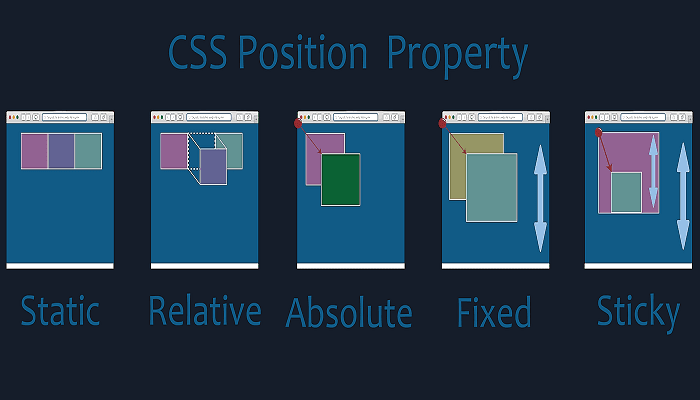
There are five types of positions. We can give these values in position property.
position: relative;
position: absolute;
position: fixed;
position: sticky;
position: static;
Let's understand the meaning of these values one by one:
Relative
When an element defines in HTML, it has already got an existing position. we can use relative position method to move the element from its already existing position to somewhere else. This is done by adjusting the top, left, right and bottom properties within it. like top: 20px; and left: 30px; etc.

Absolute
Every element has a parent element from which they are derived. If we set it position as ``` Position: absolute;
If the parent element is not there, then it considers body as its parent element and positioned with respect to body. We can adjust its position with the top, left, right and bottom properties within a it.

### Fixed
A fixed element is rigid in terms of position. If we set the position as ```position: fixed;``` then it will always their no matter what we are doing on page i.e., it will stay on its fixed position even if you scroll the page.
I am giving an example so that you can better understand, so only assume that the element you have fixed it comes out from the plane and stay there, it just for understanding don't take it as a statement.
We can, however, use the other positioning properties like top, bottom, left and right to position this element.

### Sticky
If you have understood the above three points, then comes on the ***sticky***. So basically, we can say that sticky position method lies between ```
fixed
``` and ```
relative
```. It changes its position according to the scrolling of the user and interchanges between the two properties mentioned. It is relative as long as the user is scrolling and fixed when they aren’t. Overall, it sticks and unsticks itself from time to time.

as you can see in the image, I have applied ```
position: sticky;
``` for the child element as ```
top: 10px;
``` and then when I scrolled the page it sticked itself 10px from top.
### Static
A static element which is set as default for HTML elements has no special position. It simply follows the page format where the element will fit in. It also remains unaffected by other position properties like bottom, top, left, right etc.
### Lets Summaries all the things
Oops! That has been quite a confusing. But I really hope this article helped you to understand the CSS position property and how it works.
Try it by yourself, I am sure you will get all the points which I have mentioned in this Blog. You can simply change the values and see the difference between all of them, try to use the position property to work on a personal project.
Remember that getting better at CSS takes constant practice. So, keep practicing and you'll be better in it.